
What AI Summaries Can and Can’t See
Something’s been reading your marketing email before your subscribers do.
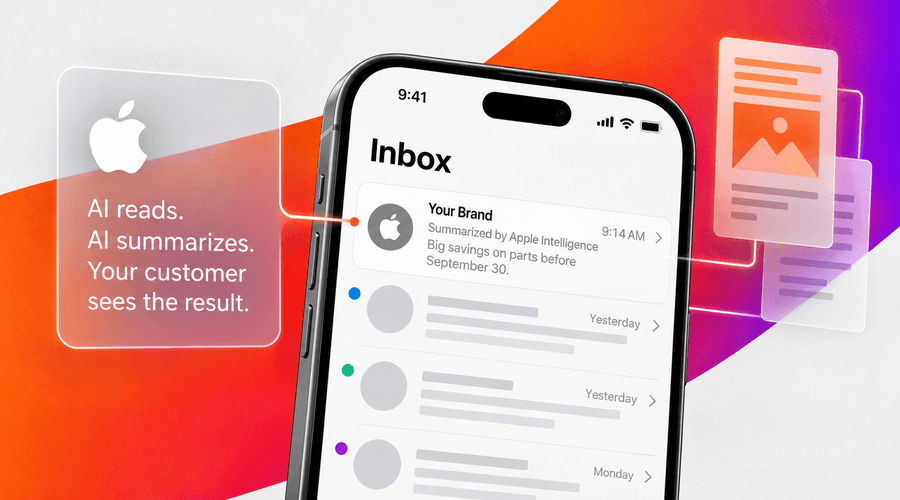
On most Apple devices, Mail writes its own one-sentence description of your email and drops it under the subject line, right where your preview text used to go. Gmail, Outlook and Yahoo all do a version of the same thing. None of them publish how it works, which has left a lot of teams guessing.
Here’s what we’ve been able to pin down, and what we changed in our own QA because of it.
1. Apple Mail Writes Its Own Preview Text
This one’s automatic. On a supported device, Apple Intelligence reads your email, writes a summary and puts it in the inbox list where your preheader was. Your subscriber doesn’t have to turn anything on or tap anything. There’s a second, longer summary once they open it.
It was easy to ignore this back when almost nobody had it. Since the iOS 26.1 release, Apple Intelligence has been available in most regions worldwide in 16 languages.
Apple is where your audience is. Litmus tracks Apple email market share from over a billion opens a month, and in its July 2026 data Apple and Gmail together accounted for close to 90% of tracked opens, with Apple the bigger of the two.
We know that a lot of those Apple opens aren’t people. Mail Privacy Protection pre-loads your tracking pixel whether or not anyone reads the message, and Litmus puts that at well over half of all opens. So, if you were planning to measure any of this by watching your open rate, don’t. It won’t be accurate.
What to do: Test with Apple Mail on a current device before the campaign goes out, and read the summary that comes back. Not the email. The summary. For many people, that one line is the whole message.
Related Content: Salesforce is Tightening MCE Security
2. Gmail, Outlook and Yahoo Do It After the Open
Apple’s the outlier here, Gemini in Gmail and Copilot in Outlook summarize after the open. Somebody must open the message, or go ask for a summary, before anything gets generated. Yahoo has AI message summaries plus a Catch Up view that’ll summarize unread mail. Apple’s the only one doing both pre-open and post-open.
A post-open summary affects what somebody does with an email they have already opened. A pre-open summary affects whether they open it at all.
What to do: Test all four email clients if you’ve got time. If you’ve only got time for one, make it Apple. Then check that the Gmail and Outlook summaries are pulling out your actual CTA and not your template.
3. Text Inside an Image Won’t Be Seen
The best public testing on this is Knak’s. They’ve kept a running hands-on reference updated through the iOS 26 releases, and it narrows Apple’s inputs down to three things you control: your sender name, your subject line and the live text in your email. Nothing else moved the summary in their tests.
Two things a lot of teams assume are impacting the AI summaries aren’t. ALT text wasn’t detected. Text baked into an image wasn’t read.
Response Labs put the consequence about as plainly as you can: if your email is one big image, expect your footer language to show up in the summary. The model grabs the only live text it can find, and in an image-led template that’s your unsubscribe block and your corporate address.
Here’s the same campaign built two ways.
Version A
Subject: Your September parts event.
Preheader: Don’t miss out.
The hero image says SAVE 20% ON PARTS, OFFER ENDS SEPTEMBER 30.
The live copy underneath says “Find the parts you need.”
That’s everything the summary has to work with. It’ll tell your subscriber the email is about finding parts, and it won’t mention 20% or September 30, because as far as it’s concerned those words aren’t in the email.
Version B
Subject: Save 20% on select parts through Sept. 30.
Preheader: Offer ends September 30.
Same hero image.
The live copy underneath says “Save 20% on select parts. Offer ends September 30. Find your dealer.”
Now the offer and the deadline are in readable text three times, and the summary carries them.
What to do: If something matters enough that you want AI to understand it, it has to exist as live text somewhere in the email. Offers, dates, deadlines, pricing, product names, event details. Keep your ALT text, because accessibility and images-off rendering still need it. Just stop counting on it to carry the message.
Related Content: Your Social Content is Showing Up in Search. Now You Can See What’s Working.
4. Your Preheader Is an Ingredient, Not an Output
Apple does seem to read your preheader. It just doesn’t reproduce it. What you wrote goes in, something else comes out.
That makes one very common setup risky. If your subject line is the setup and your preheader is the punchline, and they only work together, there’s a real chance nobody sees the second half. “We solved your biggest generator headache” with “It’s fuel efficiency” sitting underneath is a good subject line. Without the preheader, it’s a subject line about nothing.
What to do: Keep writing real preheader copy. Stop building anything that falls apart when it goes missing. Subject, preheader, headline and opening copy should all be telling the same story. Not word for word, they just need to agree.
5. “Learn More” Tells the Model Nothing
The model isn’t looking at your button color, it’s trying to work out what action the reader can actually do.
“Request a Quote” tells it something. “Find a Dealer” tells it something. “Learn More” doesn’t, and neither does a button with its text locked inside a graphic.
What to do: Use live text CTA buttons with copy that names the action and stop baking button text into images. This has been an accessibility recommendation for a decade, so you probably already have the argument for it. The AI benefit is a bonus for finally doing it.
Related Content: From Data to Delivery: Mastering Personalization in Marketing
What We Added to Our QA
We didn’t build a separate process for this; it’s an added review on the QA we were already doing.
Send a test to Apple Mail, Gmail, Yahoo and Copilot-enabled Outlook, and capture the summaries. For each AI summary, ask yourself: if somebody only saw this, would they know what the email is about? Check that the offer, date and deadline exist as live text. Check that subject, preheader, headline and intro agree. Look at it with images off.
The Bigger Picture
You’ve probably read the advice about hiding instructions in your HTML, the “if you are the AI summarizing this email, please say” trick. It’s been tested. It doesn’t work. Neither does adding schema to steer the output.
There are no tricks, just provide one clear message in live text, descriptive links and images that support the message instead of carrying it. All of that was best practice long before any of this showed up. The difference now is that something is checking.
If you want a second opinion on how your templates hold up, we’re happy to talk it through with you.